「官方代理行貨」的意義 / Why "Authorized Distributor" Matters
市面上可購買電視盒子的渠道眾多,價格差異亦可能相當明顯。然而價格背後的分別,通常並不在於硬件本身,而在於保養與售後支援。
Plenty of channels sell TV boxes, sometimes at quite different prices. What separates them is usually not the hardware itself, but warranty and after-sales support.
作為官方代理,本店出售的每部小雲盒子均附有一年保養,並可透過本地渠道處理保養事宜。非官方渠道的產品則可能面對以下情況:
As an authorized distributor, every SVICLOUD box we sell carries a one-year warranty handled through local channels. Product from unofficial channels can run into:
- 缺乏本地保養支援,出現問題須自行寄往海外 / No local warranty support
- 韌體區域不符,影響功能及更新 / Firmware region mismatch
- 缺乏正式購買單據,難以證明保養期 / No formal purchase record
請特別注意:不同地區的零售版本韌體未必互通。例如不同市場(台灣、馬來西亞、新加坡等)的零售版本,韌體區域可能並不一致,跨區使用有機會影響功能。
Note in particular: retail firmware regions are not always interchangeable. Cross-region use can affect functionality.
保養一般涵蓋範圍 / What Warranty Generally Covers
- 製造瑕疵 / Manufacturing defects
- 正常使用情況下出現的硬件故障 / Hardware failure under normal use
- 收貨時已存在的功能問題 / Functional faults present on arrival
保養一般不涵蓋範圍 / What Warranty Generally Does Not Cover
- 人為損壞(跌損、入水、外力破壞)/ Accidental damage
- 自行拆解或改裝 / Self-disassembly or modification
- 因電壓不穩或使用非原裝變壓器所造成的損壞 / Damage from unstable voltage or non-original adapters
- 正常耗損(例如遙控器按鍵長期使用)/ Normal wear and tear
- 軟件層面的使用問題(一般透過技術支援協助處理)/ Software-level usage issues
申請保養服務所需資料 / What You Need When Making a Claim
-
購買證明 — 訂單編號或收據,用以確認保養期。
Proof of purchase. -
問題描述 — 開始時間、出現頻率及發生情況。
A description of the issue. -
已嘗試的排解步驟 — 例如重新啟動、重置、更新韌體。
Steps already tried. -
如可提供,附上相片或短片 — 有助加快判斷。
Photos or a short video if possible.
聯絡前建議先行嘗試 / Worth Trying Before You Contact Us
相當比例的個案實際上並非硬件故障。建議按以下次序檢查:
A significant share of cases turn out not to be hardware faults. We suggest working through these first:
- 播放卡頓 → 多數與網絡有關,請參閱 播放卡頓十個解決方法
- 死機或自動重啟 → 請先檢查散熱,參閱 過熱成因與散熱方法
- 系統反應變慢 → 請檢查儲存空間,參閱 RAM 與儲存空間指南
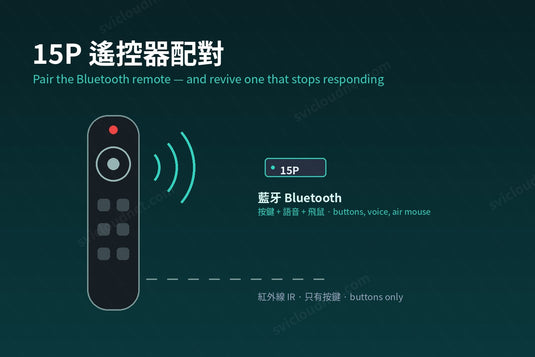
- 遙控失靈 → 請參閱 遙控器設定教學
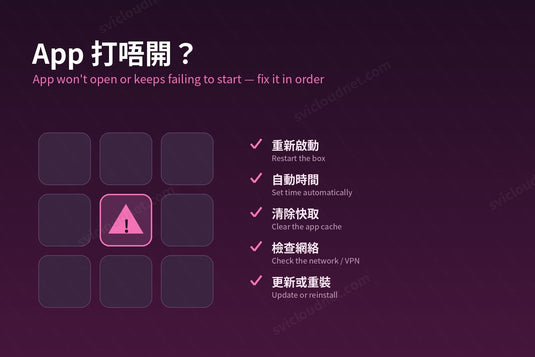
- 仍未解決 → 問題排解頁面 提供更完整步驟
需要協助 / Need Help?
完整保養條款請參閱 售後服務與保固頁面;退換貨安排請參閱 退換貨政策。如有任何查詢,歡迎 聯絡我們,或使用網站右下角的 WhatsApp 按鈕與我們聯絡。
Full warranty terms are on our After-Sales Service & Warranty page. For anything else, contact us or use the WhatsApp button at the bottom right of any page.
延伸閱讀 / Related Reading
支援與教學 / Support & Guides
- 查詢訂單 — Track Your Order(輸入訂單編號即可查看物流狀態 / live carrier status)
- 小雲盒子完整安裝教學 — Complete Setup Guide
- 問題排解 — Troubleshooting
- 技術規格與功能 — Technical Specs & Features
- 產品常見問題 — Product FAQs
- 售後服務與保固 — After-Sales & Warranty